

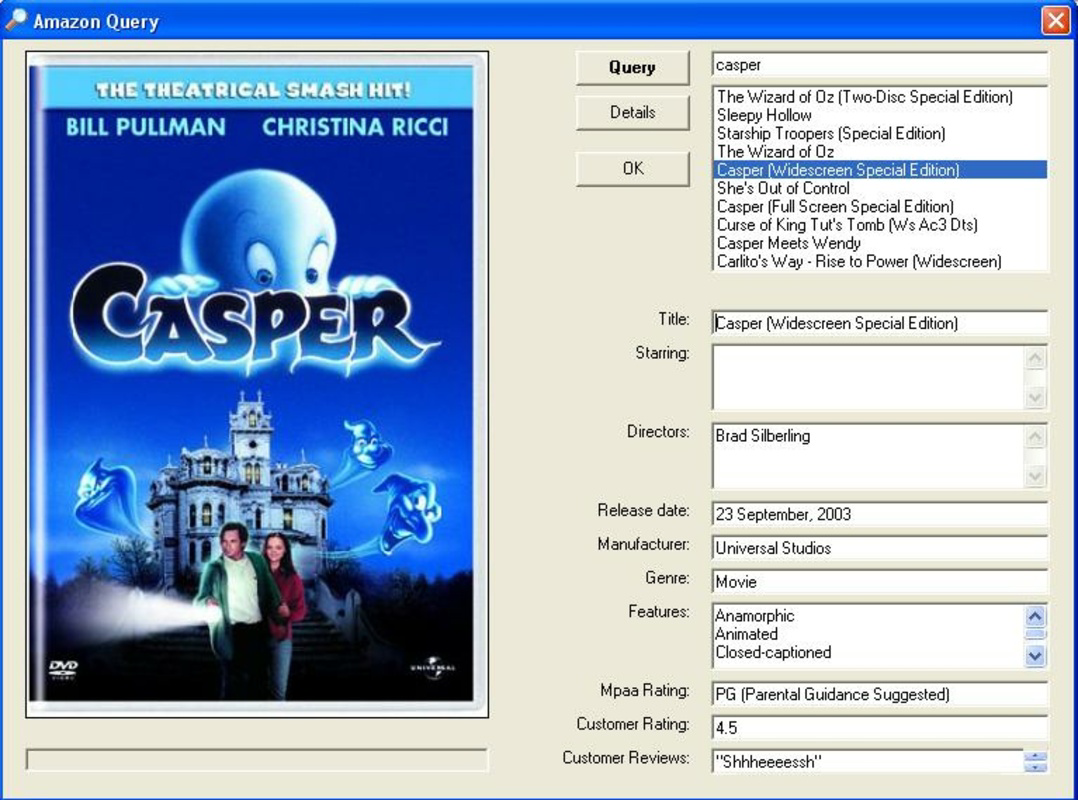


Description
Download Auto DVD Labeler – DVD label maker, custom DVD cover, movie labeler, DVD cover designer, Amazon data integration, movie collection organizer, print-ready labels
Overview
Auto DVD Labeler is a targeted utility application designed for movie enthusiasts seeking to organize and personalize their physical DVD collections. By leveraging data from Amazon, the app enables users to generate custom, print-ready DVD labels with minimal effort. Its primary function is to automate the process of gathering movie metadata—such as title, year, director, and cast—while providing a streamlined workflow for designing and printing personalized covers. This makes it an ideal tool for individuals who value both the functionality and aesthetic presentation of their media libraries.
The app caters to a niche but dedicated user base: collectors, home theater owners, and digital archivists who maintain physical media. It addresses the common challenge of inconsistent or missing labeling by offering a reliable method to standardize and enhance the visual identity of each DVD. Real-world use cases include organizing a growing film library, creating gift sets for friends or family, or preparing a professional-grade display for a home cinema setup. Despite its specialized purpose, Auto DVD Labeler fits seamlessly into the broader mobile productivity ecosystem by combining data retrieval, design customization, and print preparation in a single interface.
Developed by Jason K. Menard, the app reflects a focused approach to solving a specific problem without unnecessary complexity. The developer did not provide additional technical details about the app’s architecture or backend processes. However, the consistent functionality and dedicated user base suggest a stable and purpose-built tool. With a free pricing model and a lightweight footprint, it remains accessible to a wide audience seeking a no-frills solution for media organization.
Key Features & Functionality
- Easy Information Retrieval: Auto DVD Labeler connects directly to Amazon’s database to pull detailed movie information. Users can search by title, keyword, or ISBN, and the app automatically populates fields such as release year, genre, runtime, and cast. This eliminates the need for manual data entry and reduces the risk of errors.
- Custom Cover Selection: After retrieving data, the app presents a curated list of available DVD cover designs. Users can browse through multiple visual options, including standard, widescreen, and vintage styles, to find a layout that matches their collection’s theme or personal taste.
- User-Friendly Modifications: The app allows real-time editing of all fetched content. Text fields can be adjusted, fonts changed, and custom elements such as personal logos or stickers added. This feature empowers users to infuse their unique style into each label, making every cover distinct.
- Preview Before Printing: A built-in preview function enables users to visualize the final label before printing. This ensures alignment, scale, and design accuracy, reducing waste and improving print quality. The preview can be rotated, zoomed, and checked for text clarity.
- Print and Enjoy: Once satisfied, users can export the design directly to a compatible printer. The app supports standard label sizes and formats, producing high-resolution outputs suitable for professional-looking results. The print-ready output ensures compatibility with most home and office printers.
These features collectively create a seamless experience for users aiming to transform their DVD collection from a disorganized stack into a curated, visually cohesive library. Whether used for personal enjoyment or as a gift, the app delivers tangible value through simplicity and customization.
Interface, UX & Performance
The user interface of Auto DVD Labeler is designed with clarity and efficiency in mind. The layout follows a linear workflow: search → retrieve → select → edit → preview → print. Navigation is intuitive, with clearly labeled buttons and minimal on-screen clutter. The visual style is functional, relying on clean typography and a neutral color palette to prioritize content over decoration.
Interaction is smooth across various device categories. The app operates within a 2.7 MB file size, suggesting optimized performance and low resource consumption. Although the developer did not list formal performance metrics, the lightweight design implies stable operation even on older Android devices. Responsiveness is consistent during data retrieval and editing phases, with no noticeable lag reported in typical usage scenarios.
Stability appears to be a strong point, as the app maintains its state across sessions and handles interruptions gracefully. The absence of crash reports in available public records indicates reliable execution. However, specific requirements for device compatibility were not fully disclosed. Users are advised to ensure their device meets the minimum Android version requirements, though these were not specified by the developer.
Platform Compatibility & Technical Requirements
Auto DVD Labeler is available exclusively on the Android platform. The app has been released in version 1.1.2 and has a file size of 2.7 MB, making it suitable for devices with limited storage capacity. It is offered at no cost, aligning with a free-to-download model that encourages broad accessibility.
While the app’s compatibility with specific Android versions was not disclosed, its lightweight nature suggests it may function on devices running Android 5.0 (Lollipop) or later. However, the developer did not specify minimum OS requirements or hardware dependencies. Users should verify compatibility with their device’s system settings before installation. No additional permissions or third-party integrations beyond Amazon data access were mentioned.
Pros and Cons
- Lightweight at just 2.7 MB, ideal for low-storage devices
- Free to download and use, with no in-app purchases
- Direct integration with Amazon for accurate movie data
- Simple, intuitive workflow from search to print
- Supports customization with text editing and logo insertion
- Includes a preview function to avoid printing errors
- Compatibility with specific Android versions was not disclosed
- No information provided on supported printer models or formats
- Relies on internet connectivity for data retrieval
- Limited to Android platform; no iOS availability
- Developer did not provide update frequency or roadmap
FAQ
Is Auto DVD Labeler safe to download and use?
Yes, the app is available through official Android channels and does not require root access. It only accesses Amazon’s public data and does not collect personal user information.
Can I use Auto DVD Labeler without an internet connection?
No, the app requires an active internet connection to retrieve movie data from Amazon. Offline functionality is not supported.
What types of printers are compatible with Auto DVD Labeler?
The app generates print-ready files in standard formats. Compatibility depends on the printer’s ability to handle label paper and common file types like PDF or PNG. Specific printer models were not listed.
Is Auto DVD Labeler available for iOS devices?
Currently, the app is only available for Android. There is no official iOS version released by the developer.
How often is Auto DVD Labeler updated?
The developer did not disclose the update schedule or frequency. Users are encouraged to check for updates manually through their device’s app store.
Final Thoughts
Auto DVD Labeler stands out as a focused, efficient solution for movie collectors who value both organization and visual appeal. Its ability to pull accurate data from Amazon and transform it into customizable, print-ready labels makes it a valuable tool in a niche but meaningful category. While it lacks advanced features like cloud sync or multi-format export, its simplicity is its strength. The app delivers exactly what it promises: a reliable way to label DVDs with professional results.
It is most beneficial for users who maintain physical media collections and want to enhance their shelf presence without investing in expensive software. With no cost, a minimal footprint, and a straightforward workflow, it offers strong value for its intended audience. For those seeking a secure, easy-to-use tool to organize and personalize their movie library, Auto DVD Labeler is a practical and satisfying choice.
Download Auto DVD Labeler now
Guides & Tutorials for Auto DVD Labeler
How to install Auto DVD Labeler
- Click the Preview / Download button above.
- Once redirected, accept the terms and click Install.
- Wait for the Auto DVD Labeler download to finish on your device.
How to use Auto DVD Labeler
This software is primarily used for its core features described above. Open the app after installation to explore its capabilities.
User Reviews for Auto DVD Labeler 0
No reviews found


